



Robert Foss
March 08, 2017
Share this post:


Reading time:
Before being able to write firmware data to any production Chromebook device, the Write-Protect screw has to be removed.
This post will look specifically at removing the WP screw from a Chell (HP Chromebook 13 G1) device, and verifying that it has been successfully removed.
To actually flash firmware to Chromebook machines, a device called a Servo is needed. While these devices aren't available publicly, they can be produced freely or possibly requested from Google if you are contributing code to the ChromiumOS project.
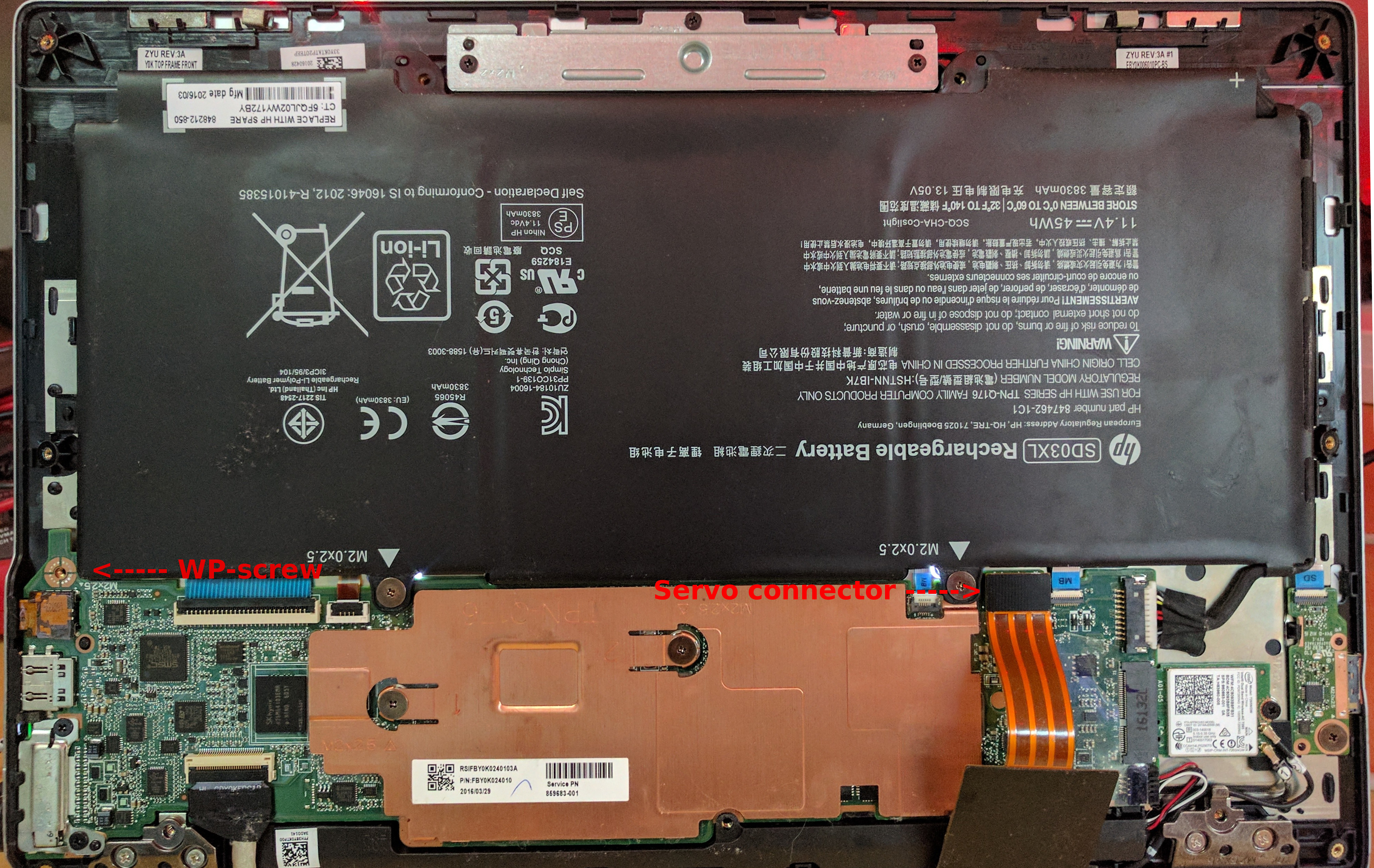
So this is what the WP screw looks like on a Chell Chromebook. This may or may not be what you will find in other devices. But if you take a close look, you will notice that the copper pad that the the screw attaches against is split into parts that are bridged by a screw being inserted.
So this is the part that requires a Servo device. And a ChromiumOS checkout, for some help setting one up, have a look at my previous post.
# Go to your ChromiumOS checkout cd /opt/chromiumos # Enter dev environment cros_sdk # Set device variable export BOARD=chell # Connect to Chromebook using a Servo device sudo servod -b $BOARD & # Disable WP # This step may vary depending on the hardware of your actual Chromebook dut-control fw_wp:off sudo /usr/sbin/flashrom -p ft2232_spi:type=servo-v2 --wp-disable sudo /usr/sbin/flashrom -p ec --wp-disable |
ChromiumOS Servo
Setting up a ChromiumOS dev environment
This post has been a part of work undertaken by my employer Collabora.
26/08/2026
Tyr’s latest Rust GPU kernel driver work puts GPU memory management in place, from VM binding and GPUVM to GEM-backed buffers and firmware…
07/07/2026
AI development is shifting from implementing models from scratch to composing powerful capabilities via APIs, enabling developers to integrate…
26/05/2026
New upstream BlueZ documentation helps simplify Bluetooth qualification for Linux-based products by mapping supported profiles, test requirements,…
14/05/2026
See how Tyr moves beyond MCU firmware boot to build the group, queue, VM, submission, and completion paths needed to run real Vulkan workloads…
07/05/2026
A complete breakdown of Mesa’s NIR compiler detailing how it optimizes shader memory access with SSA promotion, deref analysis, copy propagation,…
05/05/2026
Collabora brought Bluetooth Auracast broadcasting to MediaTek Genio 700 for Embedded World 2026. Here's the complete, fully Open Source…
Whether writing a line of code or shaping a longer-term strategic software development plan, we'll help you navigate the ever-evolving world of Open Source.


 한국어 버전의 Collabora.com 보기
 Acesse Collabora.com em Português