



Robert Foss
September 02, 2016
Share this post:


Reading time:
Note: This guide only applies to aosp version 6.x.x, and has never been tested with anything else. It is unlikely to work with aosp 7.x.x, and will definitely not work with >8.x.x.
Developing Linux for Android on Qemu allows you to do some things that are not necessarily possible using the stock emulator. For my purposes I need access to a GPU and be able to modify the driver, which is where Virgilrenderer and Qemu comes in handy.
The guide below helps you compile Android and run it on top of Qemu with Mesa/Virgilrenderer supplying a virtual GPU. Because of this, the following guide is aimed at Linux hosts.
This guide is based on Rob Herrings fantastic guide, but has been slightly streamlined and had physical hardware support stripped out.
These dependencies were available on Ubuntu 16.04, some alternative packages might be needed for other distributions.
sudo apt install autoconf gcc-aarch64-linux-gnu libaio-dev libbluetooth-dev libbrlapi-dev libbz2-dev libcap-dev libcap-ng-dev libcurl4-gnutls-dev libepoxy-dev libfdt-dev libgbm-dev libgles2-mesa-dev libglib2.0-dev libibverbs-dev libjpeg8-dev liblzo2-dev libncurses5-dev libnuma-dev librbd-dev librdmacm-dev libsasl2-dev libsdl1.2-dev libsdl2-dev libseccomp-dev libsnappy-dev libssh2-1-dev libtool libusb-1.0-0 libusb-1.0-0-dev libvde-dev libvdeplug-dev libvte-2.90-dev libxen-dev valgrind xfslibs-dev xutils-dev zlib1g-dev |
Naturally all of the paths below are configurable, this is just what I used.
export PROJECT_PATH="/opt/qemu_android" export VIRGLRENDERER_PATH="${PROJECT_PATH}/virglrenderer" export QEMU_PATH="${PROJECT_PATH}/qemu" export LINUX_PATH="${PROJECT_PATH}/linux" export ANDROID_PATH="${PROJECT_PATH}/android" export ANDROID_TOOLS_PATH="${PROJECT_PATH}/android-tools" |
Virglrenderer creates a virtual 3D GPU, that allows the Qemu guest to use the graphics capabilities of the host machine.
git clone git://git.freedesktop.org/git/virglrenderer ${VIRGLRENDERER_PATH} cd ${VIRGLRENDERER_PATH} ./autogen.sh make sudo make install |
Qemu is a full system emulator, and supports a multitude of machine architectures. We're going to to use x86_64 but also build support for arm64/aarch64.
git clone git://git.qemu-project.org/qemu.git ${QEMU_PATH} mkdir ${QEMU_PATH}/build cd ${QEMU_PATH}/build ../configure --target-list=aarch64-softmmu,x86_64-softmmu --enable-gtk --with-gtkabi=3.0 --enable-kvm make -j |
Build trunk of mainline linux kernel.
Important: The below instructions use upstream/master but during testing of this guide, https://git.kernel.org/pub/scm/linux/kernel/git/padovan/linux.git and the fences branch was used due to SW_SYNC not yet being included in upstream. Inclusion is targeted for v4.9.
git clone git://git.kernel.org/pub/scm/linux/kernel/git/torvalds/linux.git ${LINUX_PATH} cd ${LINUX_PATH} wget http://memcpy.io/files/2016-08-30/Kconfig -O ${LINUX_PATH}/.config make oldconfig make -j |
Important: If you decide not to use the .config linked in this step, a few Kconfig options need to be set:
CONFIG_ANDROID=y CONFIG_ANDROID_BINDER_IPC=y CONFIG_AUDIT=y CONFIG_HAVE_ARCH_AUDITSYSCALL=y CONFIG_AUDITSYSCALL=y CONFIG_AUDIT_WATCH=y CONFIG_AUDIT_TREE=y CONFIG_SECURITY_SELINUX=y CONFIG_SECURITY_SELINUX_BOOTPARAM=y CONFIG_SECURITY_SELINUX_BOOTPARAM_VALUE=1 CONFIG_SECURITY_SELINUX_DISABLE=y CONFIG_SECURITY_SELINUX_DEVELOP=y CONFIG_SECURITY_SELINUX_AVC_STATS=y CONFIG_SECURITY_SELINUX_CHECKREQPROT_VALUE=0 CONFIG_DEFAULT_SECURITY_SELINUX=y CONFIG_DEFAULT_SECURITY="selinux" CONFIG_VIRTIO_BLK=y CONFIG_SCSI_VIRTIO=y CONFIG_VIRTIO_NET=y CONFIG_VIRTIO_CONSOLE=y CONFIG_HW_RANDOM_VIRTIO=y CONFIG_DRM_VIRTIO_GPU=y CONFIG_VIRT_DRIVERS=y CONFIG_VIRTIO=y CONFIG_VIRTIO_PCI=y CONFIG_VIRTIO_PCI_LEGACY=y CONFIG_VIRTIO_BALLOON=y CONFIG_VIRTIO_INPUT=y CONFIG_VIRTIO_MMIO=y CONFIG_VIRTIO_MMIO_CMDLINE_DEVICES=y CONFIG_NET_9P=y CONFIG_NET_9P_VIRTIO=y CONFIG_SYNC=y CONFIG_SW_SYNC=y CONFIG_SYNC_FILE=y |
Build the Android Open Source Project.
Important: When running source build/envsetup.sh make sure that you are using bash. I had issues running lunch using zsh.
mkdir ${ANDROID_PATH} cd ${ANDROID_PATH} repo init -u https://android.googlesource.com/platform/manifest -b master cd .repo git clone https://github.com/robherring/android_manifest.git -b android-6.0 local_manifests cd .. repo sync -j cd device/linaro/generic make defconfig make all cd ../../.. # The following snippet must be run in bash bash source build/envsetup.sh # Select linaro_x86_64-userdebug lunch make -j # We don't need to use bash any longer exit |
As of this writing SW_SYNC related patches by Gustavo Padovan has yet to be included into AOSP, and therefore has to be included included manually until it is upstreamed. After switching to this branch, the AOSP project has to be rebuilt again.
cd ${ANDROID_PATH}/external/drm_hwcomposer git remote add padovan git://git.collabora.com/git/user/padovan/android-system-core.git git fetch padovan git checkout padovan/master |
Fetch the make boot image script. This script later assembles the boot image, boot.img.
git clone https://android.googlesource.com/platform/system/core.git $ANDROID_TOOLS_PATH |
When running the below script, make sure that the all of the paths from step two have been exported.
wget http://memcpy.io/files/2016-08-30/boot_android_qemu.sh -O ${PROJECT_PATH}/boot_android_qemu.sh chmod +x ${PROJECT_PATH}/boot_android_qemu.sh ${PROJECT_PATH}/boot_android_qemu.sh x86_64 |
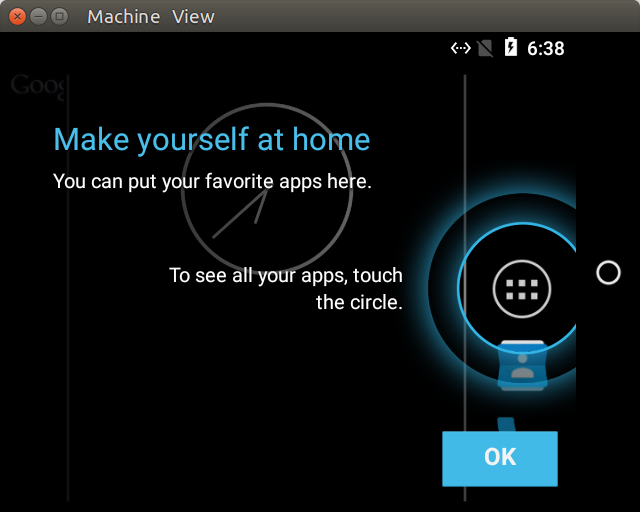
Hopefully this guide will have enabled you build the required software and run Android on Qemu with a virtual GPU. The post was has been a part of work undertaken by my employer Collabora.
26/08/2026
Tyr’s latest Rust GPU kernel driver work puts GPU memory management in place, from VM binding and GPUVM to GEM-backed buffers and firmware…
07/07/2026
AI development is shifting from implementing models from scratch to composing powerful capabilities via APIs, enabling developers to integrate…
26/05/2026
New upstream BlueZ documentation helps simplify Bluetooth qualification for Linux-based products by mapping supported profiles, test requirements,…
14/05/2026
See how Tyr moves beyond MCU firmware boot to build the group, queue, VM, submission, and completion paths needed to run real Vulkan workloads…
07/05/2026
A complete breakdown of Mesa’s NIR compiler detailing how it optimizes shader memory access with SSA promotion, deref analysis, copy propagation,…
05/05/2026
Collabora brought Bluetooth Auracast broadcasting to MediaTek Genio 700 for Embedded World 2026. Here's the complete, fully Open Source…
Whether writing a line of code or shaping a longer-term strategic software development plan, we'll help you navigate the ever-evolving world of Open Source.



 한국어 버전의 Collabora.com 보기
 Acesse Collabora.com em Português